

Is your OnStar system acting up or completely unresponsive? You rely on it for emergency help, navigation, and staying connected while on the road.
When the OnStar module runs into problems, it can leave you feeling stranded and frustrated. You might notice your GPS not working, calls dropping, or even unexpected battery drain. But don’t worry—understanding what causes these issues and how to fix them can save you time, money, and stress.
You’ll discover the common OnStar module problems, where the module is located in your vehicle, and step-by-step solutions to get your system back in shape. Keep reading to take control of your car’s safety and connectivity right now.
Credit: www.youtube.com
Onstar Module Basics
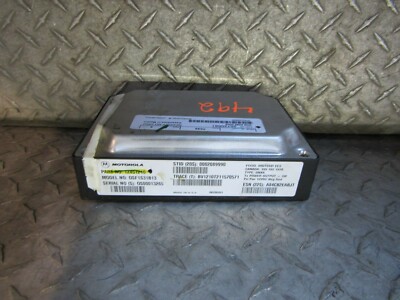
The OnStar module is a key part of many GM vehicles. It connects your car to OnStar services. These services include emergency help, navigation, and vehicle diagnostics. Understanding the basics of this module helps in identifying problems early.
Knowing where the module is placed and how it works can save time and money. It also helps you explain issues clearly to a mechanic. The OnStar module is small but powerful, and it requires proper care.
Purpose And Features
The OnStar module links your vehicle to a network of services. It can call emergency responders if you crash. It also helps you find your car if it is stolen. Other features include remote door unlock and vehicle health reports. These functions improve safety and convenience for drivers.
Common Module Locations
The OnStar module is usually hidden inside the vehicle. It often sits behind the glove box. Some trucks have it under the center console. Other places include behind the rear seat or near the trunk. The exact spot depends on the car model.
Antenna Placement
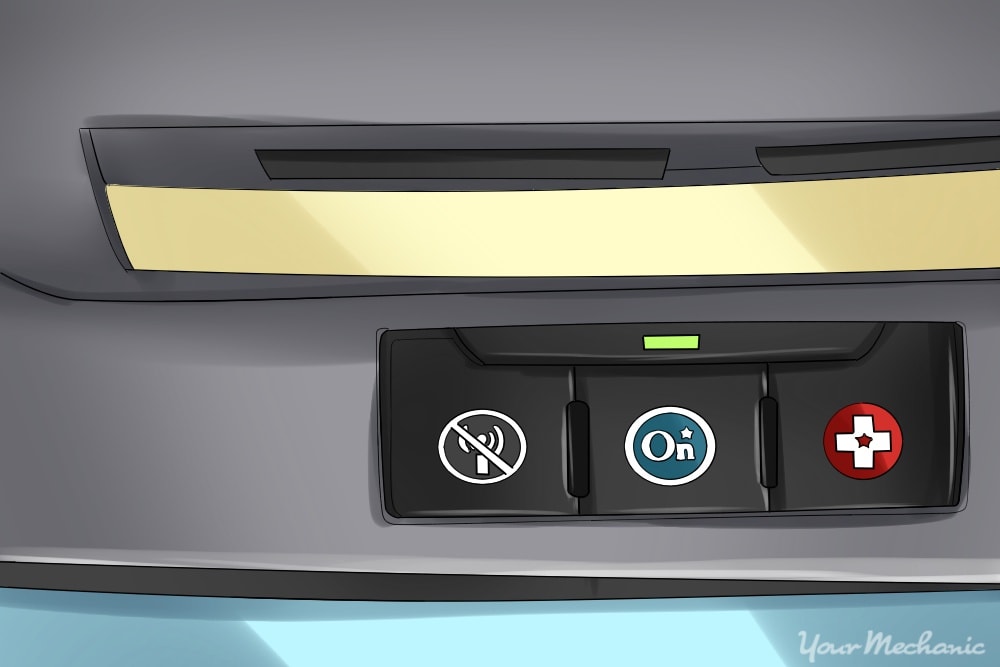
The OnStar module uses antennas to communicate. One common antenna location is on the roof center. Another spot is the windshield corner, often on the passenger side. Some vehicles place antennas on the rear bumper. Proper antenna placement ensures strong signal and reliable service.
Credit: www.ebay.com
Typical Problems
The OnStar module plays a vital role in vehicle safety and communication. Despite its importance, users often face several typical problems. These issues can affect the module’s performance and the services it provides. Understanding common problems helps in identifying and fixing them quickly.
Connectivity Issues
Connectivity problems are the most frequent with OnStar modules. The module may lose signal or fail to connect to the cellular network. This disrupts emergency calls and navigation features. Causes include poor signal strength, damaged antennas, or software glitches. Regular updates and checking antenna connections can help reduce these issues.
Hardware Failures
Hardware failures happen when the OnStar module’s internal parts stop working. This can be due to age, moisture, or physical damage. Symptoms include the module not powering on or not responding. Replacing the module or repairing damaged components often resolves the problem. Professional diagnosis is recommended for accurate repair.
Battery Drain Concerns
Some users report battery drain linked to the OnStar module. The module may continue drawing power even when the vehicle is off. This leads to a dead battery and starting problems. Causes include faulty wiring or a malfunctioning module. Inspecting electrical connections and module status can prevent battery drain issues.
Locating The Module
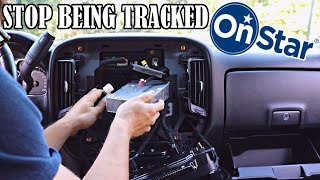
Finding the OnStar module is the first step to fixing many OnStar problems. The module controls communication between your vehicle and OnStar services. It is hidden in different spots depending on the make and model of your car. Knowing where to look saves time and avoids damage. Here are common places to check for the OnStar module.
Behind The Glove Box
The glove box is a frequent place for the OnStar module. Many sedans and SUVs store it there. You may need to open the glove box and remove some screws or panels. The module is usually a small black box with wiring connected to it. This location offers easy access for inspection or replacement.
Under The Center Console
In trucks and larger vehicles, the OnStar module often sits beneath the center console. This area may require removing the console cover or side panels. The module stays tucked away but remains reachable. It connects to the vehicle’s power and communication systems in this spot.
Rear Seat And Trunk Areas
Some vehicles place the OnStar module behind the rear seat or inside the trunk. Look under the rear deck or behind trim panels near the wheel well. Access here can be tricky and might need panel removal. This position helps protect the module from damage and keeps it out of sight.
Using Vehicle Manuals And Online Resources
Your vehicle’s manual is a valuable tool for locating the OnStar module. It often shows exact locations and how to access them safely. Online forums and repair guides can also provide model-specific tips. Searching your car’s make, model, and year will bring helpful diagrams and advice. Professionals can assist if you feel unsure.
Troubleshooting Steps
Troubleshooting OnStar module problems can restore your vehicle’s safety and communication features. Simple checks often fix common issues without costly repairs. Follow these steps carefully to identify and solve module errors.
Checking Software Updates
Start by verifying the OnStar module’s software is up to date. Outdated software may cause malfunctions or loss of connectivity. Visit your vehicle manufacturer’s website or use the OnStar app to check for updates. Installing the latest version ensures compatibility and fixes bugs. If updates fail, try restarting the module before proceeding.
Resetting The Module
Resetting the OnStar module can clear temporary glitches. Locate the reset button, usually behind the glove box or under the center console. Press and hold it for 10 to 15 seconds until the system restarts. This action can restore normal operation by refreshing the module’s software. If the reset does not work, continue with wiring inspection.
Inspecting Wiring And Connections
Loose or damaged wiring often causes OnStar module problems. Carefully check all connections near the module for corrosion or loose plugs. Use a flashlight to see hidden wiring behind panels. Secure any loose connectors and clean corroded terminals gently. Faulty wiring may require professional repair to prevent further issues.
When To Replace The Module
Knowing the right time to replace your OnStar module saves time and money. This module controls many safety and communication features in your vehicle. Ignoring its problems can lead to bigger issues. Watch for signs that show the module needs replacement.
Signs Of Irreparable Damage
Constant error messages or failure to connect are key signs. If the module does not power on or resets often, it may be damaged beyond repair. Physical damage such as water exposure or broken parts can also mean replacement is needed. When repairs no longer fix the problem, replacement is the best option.
Cost Considerations
Replacing the OnStar module can be costly but needed to maintain safety features. Repair costs might add up if the module is faulty. Compare repair and replacement prices before deciding. Sometimes, buying a new or refurbished module saves money in the long run. Factor in labor costs for installation as well.
Finding Compatible Replacements
Choose a replacement module that matches your vehicle’s make and model. Compatibility ensures all features work properly. Check for modules from trusted suppliers or authorized dealers. Refurbished modules can be a budget-friendly option if they come with a warranty. Avoid generic parts that may cause further problems.
Professional Support
Professional support plays a crucial role in resolving OnStar module problems. These issues can affect your vehicle’s safety features and connectivity. Getting help from experts ensures a proper diagnosis and repair. Skilled professionals have the right tools and knowledge to fix the module quickly and safely.
Contacting Onstar Customer Service
OnStar offers customer service to assist with module issues. You can call their support team to explain the problem. They can guide you through simple troubleshooting steps. In some cases, they may reset your system remotely. Customer service can also schedule a service appointment if needed.
Visiting Dealerships
Authorized dealerships have direct access to OnStar systems. They can run detailed diagnostics on your vehicle’s module. Dealership technicians have updated software and tools specific to your car model. Visiting a dealership can save time and ensure accurate repairs. They may also check for recalls or updates related to OnStar.
Using Certified Technicians
Certified technicians have special training in OnStar and vehicle electronics. They follow manufacturer guidelines to repair or replace the module. Using certified experts reduces the risk of further damage. They can also verify that the system works properly after repair. Certified technicians provide reliable service with quality parts.
Preventive Measures
Preventing problems with your OnStar module saves time and money. Taking simple steps can keep the system reliable. Regular care helps avoid unexpected failures and keeps your vehicle’s safety features working.
Regular Software Maintenance
Keep your OnStar software updated. Car manufacturers release updates to fix bugs and improve performance. Visit your dealership or use the vehicle’s update system often. Updated software reduces errors and enhances connectivity.
Safe Vehicle Usage
Avoid rough driving that can damage electronic parts. Keep the interior clean and dry to protect the module. Do not attempt to modify the OnStar system yourself. Proper use prevents hardware damage and maintains system stability.
Battery Health Tips
Check your car battery regularly. A weak battery can cause the OnStar module to malfunction. Clean battery terminals and ensure tight connections. Replace the battery if it shows signs of wear. Good battery health supports all electronic systems, including OnStar.
Credit: www.yourmechanic.com
Frequently Asked Questions
What To Do If Onstar Is Not Working In Your Car?
Check your OnStar subscription status and vehicle settings. Restart your car to reset the system. Inspect the module and wiring for damage. Update the OnStar software if available. Contact a certified technician or OnStar support for further diagnosis and repair.
Why Is Onstar Being Discontinued?
OnStar is being discontinued due to privacy concerns and complaints about sharing user data with third-party analytics companies.
Where Is The Onstar Module Located?
The OnStar module is usually behind the glove box, under the center console, or behind rear seats. Some vehicles place it near the trunk or integrate it with antennas on the roof, windshield corner, or rear bumper. Check your vehicle manual for exact location details.
What Is The Onstar Module?
The OnStar module connects your vehicle to emergency and navigation services. It detects crashes, sends GPS data, and enables hands-free communication. Located behind panels or under consoles, it ensures safety and assistance through automatic alerts and live support.
What Are Common Onstar Module Problems In Vehicles?
Common issues include module disconnection, software errors, and poor signal reception.
Conclusion
OnStar module problems can affect your vehicle’s safety features. Regular checks help catch issues early. Simple fixes often restore proper function quickly. Seek professional help if problems persist or seem complex. Understanding your car’s OnStar system improves your driving confidence.
Stay informed to keep your system working well. Don’t ignore warning signs or error messages. Taking action early saves time and money later. Keeping your OnStar module in good shape protects you on the road.