

If you own a Mazda or are thinking about getting one, you might be wondering what’s happening with Mazda Connected Services. These smart features used to come free for a trial period, letting you control your car remotely, check its status, and even find it on a map—all from your phone.
But now, Mazda Connected Services has been discontinued in its previous form, and this change could impact how you interact with your vehicle every day. You’ll learn exactly what Mazda Connected Services discontinuation means for you, how it affects your current subscription, and what alternatives or new options you have moving forward.
Keep reading to stay in control of your Mazda experience without any surprises.

Credit: www.reddit.com
Mazda Connected Services End
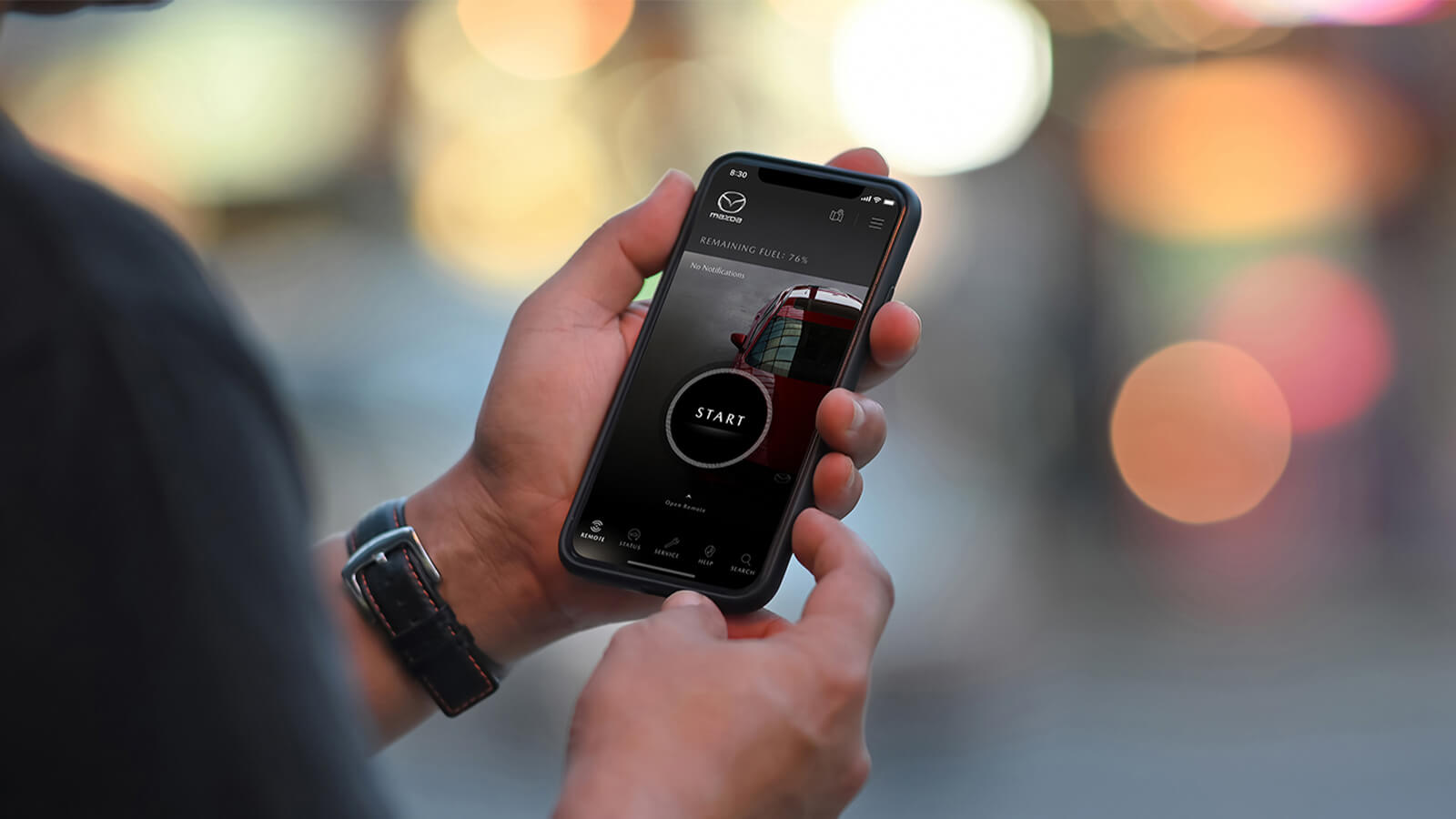
Mazda Connected Services provided drivers with remote features like vehicle status updates and remote start. These services enhanced convenience and control through the MyMazda app. Recently, Mazda announced the end of Mazda Connected Services, impacting many users.
This change means some remote functions will no longer be available without a subscription or at all. The shift affects certain models and service timelines. Understanding these details helps Mazda owners prepare for the changes.
Timeline Of Discontinuation
Mazda began phasing out free access to Connected Services in 2023. New vehicles purchased after this date require a paid subscription to use remote features. The complimentary trial period ended for many users by mid-2024.
After the trial, Mazda owners must register for a paid plan to maintain service. Some older models lost access to services earlier in the phase-out. Mazda plans to fully end support for all free services by late 2024.
Models Affected
The discontinuation affects most Mazda models equipped with Connected Services since 2018. Popular models include the Mazda3, CX-5, and CX-9. Owners of these vehicles need to check if their trial period has expired.
Older vehicles without subscription plans will lose remote access features. Newer models require activation of paid plans to continue using Mazda Connected Services. Checking model compatibility with Mazda’s official updates is important.

Credit: www.reddit.com
Subscription Changes
Mazda Connected Services recently made important changes to its subscription plans. These updates affect how drivers access remote features. Understanding these changes is key to continuing use without interruption.
The subscription model now requires users to pay after a free trial ends. This shift impacts new and existing Mazda owners. Knowing the details helps you make informed decisions about your vehicle’s connectivity options.
Trial Period Details
New Mazda vehicles come with a free trial of Connected Services. This trial starts on the purchase or lease date. It lasts for one year, allowing full access to all features. After the trial, users must subscribe to keep using the services.
New Subscription Fees
Once the trial ends, a monthly fee applies. The cost varies but typically ranges around $19.99 per month. This fee covers remote start, vehicle status, and keyless entry. Paying the fee ensures continuous access to these remote features.
How To Manage Subscription
Subscriptions can be managed online through the MyMazda website. Log in at owners.mymazda.com to view or update your plan. You can change payment methods or cancel the subscription anytime. Managing your account online keeps your services active without hassle.
Key Features Lost
With Mazda Connected Services discontinued, drivers need new ways to stay connected to their vehicles. Several options offer similar convenience and control over car features. These alternatives help maintain remote access, vehicle tracking, and more. Drivers can choose solutions based on their needs and budgets.
Third-party Apps
Third-party apps provide many functions once offered by Mazda Connected Services. These apps work with various car models and offer features like remote start, lock/unlock, and vehicle status alerts. Some popular apps include CarLink, Viper SmartStart, and Bouncie.
These apps often connect via your smartphone and a small device plugged into the car’s OBD-II port. They provide real-time updates and alerts. Many apps offer monthly subscriptions, usually at lower prices than manufacturer services.
Drivers gain flexibility using third-party apps. They often support multiple vehicles and allow customization of alerts. These apps are useful for drivers who want easy access without brand restrictions.
Aftermarket Solutions
Aftermarket solutions include hardware and software installed in your car. These systems add remote functions like engine start, security alarms, and GPS tracking. Brands like Viper, Compustar, and Directed make such products.
Aftermarket systems usually require professional installation. They connect to the vehicle’s electrical system and communicate with your phone via an app. These systems often offer better range and additional security features.
These solutions suit drivers who want robust control over their vehicles. Aftermarket products often come with warranties and technical support. They also add value to cars without built-in connected services.
Credit: www.mazda.ca
Alternatives For Drivers
Preparing for the discontinuation of Mazda Connected Services helps avoid surprises. Taking steps now ensures a smooth transition. This guide covers subscription cancellation, data backup, and app usage after the service ends.
Subscription Cancellation
Check your current subscription status in the MyMazda app. Cancel your subscription before the service stops to avoid extra charges. Follow the cancellation instructions on the Mazda website or app. Keep confirmation emails for your records. Act early to prevent automatic renewals.
Data Backup Options
Download important data from your Mazda Connected Services account. Save trip history, settings, and preferences to your device. Use screenshots or export options available in the app. Backup ensures you keep useful information after the service ends. Store files in a safe location for easy access later.
App Usage After Discontinuation
Some app features may stop working once services end. Check which functions remain available without a subscription. Plan alternative ways to access vehicle information or remote controls. Stay updated through Mazda’s official communications for app changes. Use the app offline for limited access if possible.
Frequently Asked Questions
Is Mazda Connect No Longer Free?
Mazda Connect offers a free trial for new vehicles, but a paid subscription is required after it ends.
How Much Is Mazda Connected Services Per Month?
Mazda Connected Services costs about $18 per month after the complimentary trial ends. It includes remote start, vehicle status, and more. Manage subscriptions via the MyMazda app or owners. mymazda. com.
Does Mazda Require A Subscription For Remote Start?
Yes, Mazda remote start requires a subscription after the complimentary trial ends. Access it via the MyMazda App.
What Is Mazda Connected Service?
Mazda Connected Service lets you control and monitor your car remotely via the MyMazda app. Features include remote start, door lock/unlock, vehicle status, and location tracking. New vehicles often get a complimentary trial, after which a subscription is required to continue using these services.
What Is Mazda Connected Services?
Mazda Connected Services offers remote vehicle features via the MyMazda app for easy control.
Conclusion
Mazda Connected Services no longer offers a free trial. Owners now need to pay for continued access. The service lets you control your car remotely using the MyMazda app. Features include remote start, door locking, and vehicle status checks. Managing your subscription is easy through the Mazda website.
Staying informed helps you decide if the service fits your needs. Keep an eye on updates from Mazda for any changes. This shift affects how drivers interact with their vehicles daily. Choose wisely to get the best value for your car.