

Are you struggling with your GMC Sierra door locks not working properly? You’re not alone.
Many Sierra owners face frustrating door lock problems that can make locking and unlocking your truck a daily hassle. Whether your key fob isn’t responding, some doors won’t lock, or the locks act unpredictably, these issues can affect your safety and convenience.
But don’t worry—understanding the common causes and simple fixes can save you time and money. You’ll discover easy steps to diagnose and solve your GMC Sierra door lock problems so you can get back on the road with confidence. Keep reading to find the solutions that work for you.
Credit: jprstudies.org
Common Door Lock Issues
Common door lock issues affect many GMC Sierra owners. These problems can stop your doors from locking or unlocking properly. Understanding frequent causes helps find quick solutions.
Some issues are simple, like dead batteries. Others involve electrical faults or system settings. Knowing what to check saves time and stress.
Key Fob Battery Problems
A weak or dead key fob battery often causes door lock failures. The fob sends signals to lock or unlock doors. When the battery drains, signals do not reach the vehicle.
Replacing the battery usually fixes the problem. Keep a spare battery handy for emergencies.
Infotainment Settings Impact
The GMC Sierra’s infotainment system controls some door lock functions. Settings like “passive door unlock” can affect how locks respond. Incorrect settings might prevent doors from unlocking automatically.
Check your vehicle’s manual to review and adjust these settings. Resetting the system can restore normal lock behavior.
Blown Fuses And Wiring Damage
Fuses protect the door lock electrical system. A blown fuse stops power from reaching the locks. This causes all locks to fail at once. Fuses can blow from age or electrical surges.
Wiring damage from wear or accidents also disrupts lock operation. Inspect fuses and wiring carefully. Replace faulty components to restore lock function.

Credit: ortopalma.com
Diagnosing Electrical Faults
Diagnosing electrical faults in GMC Sierra door locks involves careful inspection of key components. Electrical issues often cause doors to fail locking or unlocking properly. Identifying the exact problem saves time and repair costs. This section guides you through essential diagnostic steps for electrical faults.
Checking Door Lock Actuator
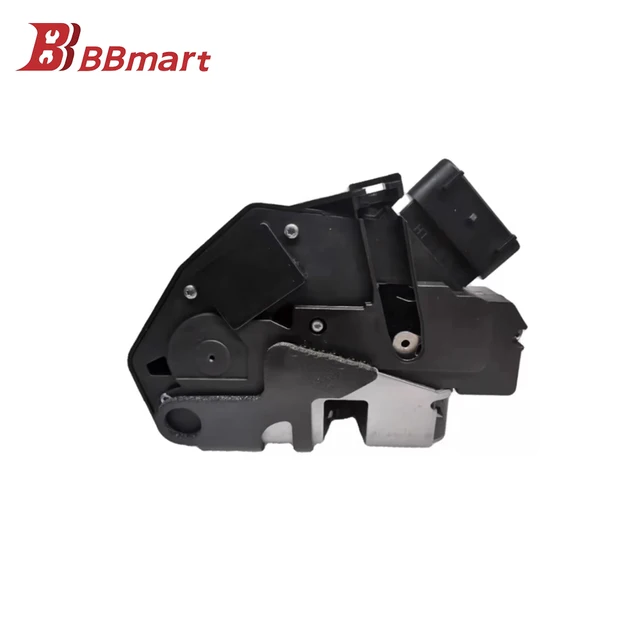
The door lock actuator controls the locking mechanism. Listen for a clicking sound when pressing the lock or unlock button. No sound may indicate a faulty actuator. Remove the door panel to access the actuator for testing. Use a multimeter to check if the actuator receives power. Replace the actuator if it does not respond.
Testing Power And Ground Connections
Power and ground connections supply electricity to the door locks. Check the fuse box for any blown fuses related to door locks. Use a multimeter to test voltage at the lock wiring harness. Ensure ground wires have a solid connection to the vehicle chassis. Loose or corroded connections can cause door lock failures. Clean and tighten any faulty connections found.
Inspecting Central Locking Switch
The central locking switch sends signals to all door locks. Test the switch by pressing lock and unlock buttons. If some or all doors do not respond, the switch might be defective. Remove the switch panel and check wiring for damage. Use a multimeter to verify continuity through the switch. Replace the switch if electrical faults are detected.
Quick Fixes For Door Locks
Door lock issues in a GMC Sierra can be frustrating and inconvenient. Quick fixes often solve common problems without a mechanic’s help. Simple steps can restore your locks’ function fast. Try these easy methods before considering costly repairs.
Replacing Key Fob Battery
A dead key fob battery can stop locks from working. Replace the battery with a new one matching your fob’s model. Open the fob case carefully using a small screwdriver. Remove the old battery and insert the new one with correct polarity. Test the key fob to see if the locks respond.
Resetting Infotainment Settings
The infotainment system controls many vehicle functions, including door locks. Resetting settings can fix glitches affecting lock operation. Turn on your GMC Sierra and access the infotainment menu. Find the “Settings” or “Vehicle” section. Look for “Door Lock” or “Passive Unlock” options and reset them to default. Restart the vehicle and test the locks again.
Changing Blown Fuses
Blown fuses can cut power to the door locks. Locate the fuse box, usually under the dashboard or hood. Use the owner’s manual to find the door lock fuse. Remove the fuse and inspect it for a broken filament. Replace it with a fuse of the same amperage rating. Test your door locks after changing the fuse.

Credit: www.youtube.com
Repairing Door Lock Actuator
The door lock actuator controls the locking and unlocking of your GMC Sierra’s doors. Repairing it restores proper door function and safety. This guide walks you through the repair process in clear, simple steps.
Removing Door Panel Safely
Start by disconnecting the battery to avoid electrical shocks. Use a flat tool to gently pry off the door panel clips. Remove all screws holding the panel, often hidden behind handles or trim. Lift the panel carefully to avoid breaking any clips or wires. Set the panel aside on a soft surface to prevent damage.
Identifying Faulty Actuator
Listen for unusual noises when locking or unlocking doors. A faulty actuator often makes clicking or grinding sounds. Check if the door lock moves slowly or not at all. Test the door lock with the key fob and manual switch. If the lock doesn’t respond, the actuator likely needs replacement.
Actuator Replacement Steps
First, disconnect the wiring harness connected to the actuator. Remove the screws or bolts holding the actuator in place. Take out the old actuator gently to avoid damaging the door components. Install the new actuator by securing it with screws or bolts. Reconnect the wiring harness and test the lock function before reassembling the door panel.
Wiring And Switch Solutions
Wiring and switch problems often cause GMC Sierra door lock issues. Faulty wiring or a bad switch can stop locks from working properly. Fixing these parts usually restores door lock function quickly. Understanding common wiring and switch issues helps diagnose and repair problems effectively.
Inspecting Door Wiring Harness
Start by checking the door wiring harness carefully. Look for broken, frayed, or pinched wires. Wiring damage often happens near the door hinge. Use a flashlight to see inside the harness. Test wires with a multimeter for continuity. Replace or repair any damaged wires found.
Repairing Corroded Connections
Corrosion can block electrical signals in door lock circuits. Inspect connectors for rust or green buildup. Clean corroded terminals with electrical contact cleaner. Use a small brush or sandpaper to remove stubborn corrosion. After cleaning, apply dielectric grease to prevent future corrosion. Secure connections firmly to avoid loose contacts.
Replacing Central Locking Switch
The central locking switch controls door lock functions. A faulty switch can cause locks to stop responding. Remove the door panel to access the switch. Test the switch using a multimeter for proper operation. Replace the switch if it shows no continuity or erratic behavior. Reinstall the panel and test the locks again.
Preventive Maintenance Tips
Preventive maintenance helps avoid GMC Sierra door lock problems. Taking simple steps can keep locks working well. Regular care reduces repair costs and frustration. Follow these tips to protect your vehicle’s door locks and enjoy smooth operation.
Regular Inspection Routine
Check door locks at least once a month. Look for signs of wear, rust, or dirt. Test all lock buttons and key fob functions. Listen for unusual noises when locking or unlocking. Early detection of issues prevents bigger problems later.
Protecting Electrical Components
Keep wiring and connectors dry and clean. Moisture can cause corrosion and short circuits. Avoid spraying water directly near door lock controls. Use dielectric grease on electrical contacts to prevent rust. Ensure door seals are intact to block water entry.
Using Quality Replacement Parts
Choose OEM or high-quality parts for repairs. Cheap parts often fail quickly and cause more damage. Verify part compatibility with your GMC Sierra model. Proper parts improve lock performance and durability. Invest in quality to save time and money long-term.
When To Seek Professional Help
Knowing when to seek professional help for GMC Sierra door lock problems is important. Simple issues might be fixed at home. But complex problems need expert attention. Ignoring serious problems can cause more damage and higher repair costs. Watch for signs that show the problem is beyond a basic fix. Acting early can save time and money.
Complex Wiring Issues
Door lock systems depend on wiring that connects various parts. Wiring can get damaged, corroded, or disconnected. These issues cause locks to fail or work intermittently. Finding wiring problems is hard without special tools. Professionals trace wires safely and fix faults. Avoid trying to fix wiring yourself. Mistakes can cause electrical shorts or more damage.
Persistent Lock Failures
Sometimes door locks fail repeatedly despite attempts to fix them. This could mean the actuator or control module is faulty. Persistent lock failure might also indicate hidden problems. Professionals know how to check all parts thoroughly. They replace defective components with the right parts. Continuing to use faulty locks risks safety and convenience. Professional repair restores reliable lock function.
Expert Diagnostic Tools
Technicians use advanced diagnostic tools to find lock problems. These tools read error codes and test electrical signals. They help pinpoint the exact cause of door lock issues. Using these tools ensures a precise and efficient repair. Without them, repairs can be guesswork and may fail. Professional diagnostics save time and prevent repeated problems.
Frequently Asked Questions
What’s The Worst Year For The Gmc Sierra 1500?
The worst year for the GMC Sierra 1500 is often considered 2007. This model faced frequent transmission and electrical problems. Many owners reported door lock and actuator failures. Reliability and repair costs were notably poor that year.
What Are The Symptoms Of A Bad Door Lock Relay?
Symptoms of a bad door lock relay include doors not locking with the lock button, only some doors locking, and inconsistent locking behavior. The relay may fail to open or close door locks properly, causing unreliable power lock operation.
What Would Cause All Four Power Door Locks To Not Work?
A blown fuse, dead key fob battery, faulty door lock actuator, damaged wiring, or incorrect infotainment settings can cause all four power door locks to fail. Check these components first to diagnose the issue accurately.
How To Reset Electric Door Locks?
To reset electric door locks, remove the batteries for a few minutes, then reinsert them. Check the manufacturer’s manual for specific reset instructions if no reset button exists.
What Causes Gmc Sierra Door Locks To Stop Working?
Common causes include blown fuses, faulty door lock actuators, and wiring issues.
Conclusion
GMC Sierra door lock problems can be frustrating and inconvenient. Start by checking the key fob battery and settings in your truck’s system. Inspect fuses and wiring for any visible damage next. A faulty door lock actuator often causes these issues.
Testing power at the actuator can help pinpoint the problem. Sometimes, the door lock switch might fail or wiring may have deeper faults. Simple fixes can solve common problems, but complex issues need a professional’s help. Staying aware of these steps can keep your GMC Sierra’s locks working smoothly.