

Are you facing a frustrating “FiTech ECU No Response” message and wondering what’s going wrong with your fuel injection system? If your engine refuses to start or the handheld controller won’t communicate with the ECU, you’re not alone.
This common issue can leave you stuck and clueless about the next steps. But don’t worry—understanding why your FiTech ECU isn’t responding and learning the simple checks you can perform might just get you back on the road faster than you think.
Keep reading to discover easy troubleshooting tips and solutions that will help you regain control of your vehicle’s performance.

Credit: www.youtube.com
Common Causes Of No Response
When the FiTech ECU shows no response, troubleshooting starts with understanding common causes. Several issues can prevent communication between your handheld controller and the ECU. These problems usually relate to power, wiring, or settings. Identifying the root cause helps fix the issue quickly and avoids unnecessary part replacements.
Power And Ground Issues
Without proper power, the ECU cannot function or respond. Check the battery voltage and ensure all power connections are tight. A loose ground wire or corroded terminal can block signals. Always inspect the main power and ground wires first. Clean any corrosion and secure all connections firmly. A weak battery or bad ground often causes no response errors.
Faulty Wiring And Connections
Damaged or loose wiring can break communication lines. Look for frayed wires, broken pins, or loose connectors. Wiring harnesses can get pinched or worn over time. Use a multimeter to test continuity in cables. Replace or repair any faulty wires. Secure all connectors to prevent vibrations from causing disconnections. Proper wiring is essential for smooth ECU operation.
Handheld Controller Problems
The handheld controller must work correctly to communicate with the ECU. Check the controller’s battery level and replace if low. Inspect the controller’s cable for damage or loose ends. Try connecting the controller to another ECU if possible. Sometimes, the handheld unit itself may be defective. Reset or update the controller software to fix bugs. A faulty controller often mimics ECU no response errors.
Locked Calibration Settings
Locked calibration or security settings can block communication. The ECU may be locked to prevent unauthorized changes. Access to locked settings requires proper passwords or reset procedures. Check if the ECU is in a locked state through the handheld interface. Reset the ECU to factory settings if possible. Locked calibration stops the handheld from reading or writing data.
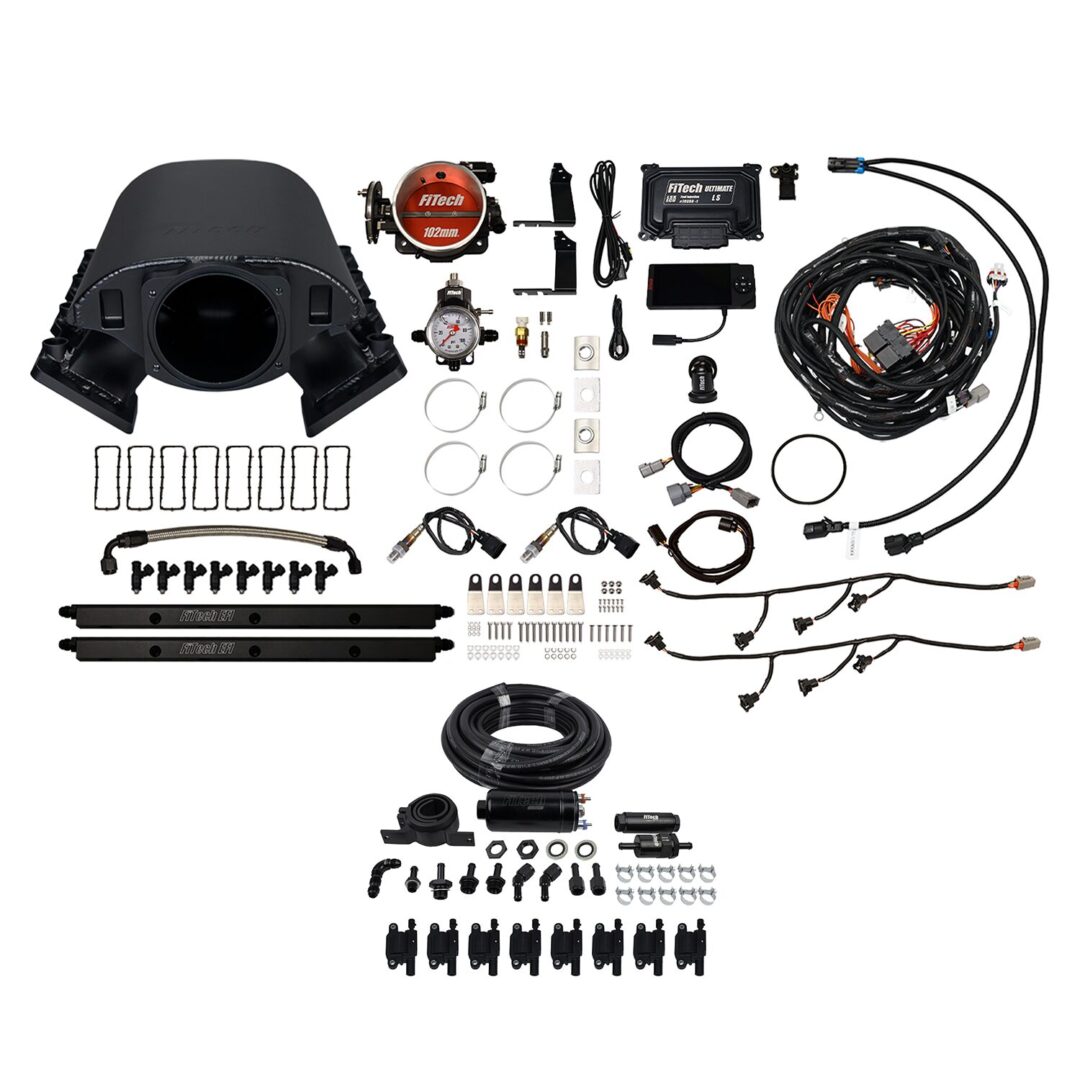
Credit: fitechefi.com
Initial Checks
When the FiTech ECU shows no response, starting with basic checks saves time. These initial checks help spot simple issues that block communication. Focus on power, grounding, and wiring first. Clear connections are vital for the ECU to function properly.
Begin by confirming battery voltage and secure connections. Next, verify the ground connection to ensure a stable circuit. Finally, inspect wiring for any damage or loose ends. These steps often solve the no response problem quickly.
Battery Voltage And Connections
Check the battery voltage with a multimeter. The reading should be around 12.6 volts with the engine off. Low voltage can stop the ECU from powering up. Inspect battery terminals for corrosion or loose clamps. Clean and tighten connections as needed. A weak battery or poor connection can cause no response.
Ground Connection Verification
Grounding is critical for the ECU’s operation. Locate the ECU ground wire and check its connection point. Ensure the ground wire is solidly attached to the chassis or engine block. Use a multimeter to test continuity between ground and battery negative. A bad ground can disrupt ECU signals and cause failure to respond.
Wiring Inspection Tips
Look over all wiring harnesses connected to the ECU. Search for broken wires, frayed insulation, or disconnected plugs. Wiggle connectors gently to spot loose contacts. Pay close attention to the main power and ground wires. Repair any damaged wiring with proper tools and connectors. Faulty wiring often causes communication errors with the ECU.
Resetting The Ecu
Resetting the ECU is a simple and effective step to resolve the FiTech ECU no response issue. This process clears old data and allows the system to start fresh. It helps the ECU communicate properly with the handheld controller. Resetting often fixes minor glitches and improves system performance.
Follow the steps below to reset your ECU using the FiTech handheld controller. Each step guides you through the process clearly and safely.
Using The Handheld Controller
Turn on the ignition but do not start the engine. Connect the handheld controller to the ECU port. Power up the handheld and wait for the main menu to appear. This device lets you access ECU functions easily. Navigate through the menus to find reset options.
Reset Learn Option
Scroll to the “Initial Setup” menu on the controller. Locate the “Reset Learn” option within this menu. Select “Reset Learn” and confirm your choice. This clears the ECU’s memory of previous settings. The ECU will forget old data and start fresh after this reset.
Saving Settings And Restarting
After resetting, save all changes on the handheld controller. Turn off the ignition and disconnect the controller. Wait a few seconds before turning the ignition back on. Start the engine and let it idle. The ECU will now relearn settings based on current conditions.
Diagnosing Handheld Controller Issues
Diagnosing handheld controller issues is key to solving FiTech ECU no response errors. The controller links you to the ECU, allowing adjustments and monitoring. If the controller fails, communication ends, causing frustration and delays.
Understanding how to test and fix the handheld controller helps restore smooth ECU function. This section covers simple steps to check controller health and update firmware. Follow these tips to identify and resolve common problems quickly.
Testing Controller Functionality
Start by checking the controller’s power and screen response. Ensure the battery is charged or the unit is connected to power. Press buttons and watch for screen activity or error messages. No display may mean a dead battery or hardware fault.
Next, connect the controller to the ECU using the correct cable. Look for a stable connection message or live data on the screen. If the controller shows “no response,” try another cable or port. This helps isolate if the controller or wiring is faulty.
Test all buttons and menus to confirm they work. Unresponsive controls can indicate a damaged keypad or internal issue. Restart the controller and repeat tests to rule out temporary glitches. Proper testing reveals if the controller needs repair or replacement.
Replacing Or Updating Firmware
Firmware controls the handheld controller’s functions and communication. Outdated or corrupted firmware can cause no response errors. Check the current firmware version in the controller’s settings menu.
Visit the FiTech website to download the latest firmware update. Follow the instructions carefully to install the update using a USB or SD card. Do not interrupt the process to avoid bricking the device.
If the controller remains unresponsive after updating firmware, consider a replacement. Contact FiTech support for advice on warranty or repair options. Keeping firmware current ensures better reliability and compatibility with your ECU.
Wiring And Harness Troubleshooting
Wiring and harness issues often cause the FiTech ECU to show no response. A careful check of the wiring system can help find faults quickly. Faulty wires or loose connections stop the ECU from working properly. Troubleshooting these parts can save time and money on repairs.
Checking For Damaged Wires
Look closely at all wires connected to the ECU. Find any cuts, burns, or worn spots on the insulation. Damaged wires can cause poor signals or short circuits. Replace any wire that looks broken or frayed. Use electrical tape for minor damage only if it fully covers the wire.
Ensuring Secure Connections
Make sure all plugs and connectors fit tightly. Loose or dirty connections block the flow of electricity. Unplug each connector and clean the pins with a small brush or contact cleaner. Reconnect firmly to avoid movement. Check that no pins are bent or missing inside the plugs.
Using A Multimeter For Testing
A multimeter helps find wiring faults by measuring voltage and continuity. Set it to the correct mode before testing. Check if wires carry power from the battery to the ECU. Test continuity by probing both ends of a wire. A lack of continuity means a break inside the wire. Replace any wire that fails these tests.
Advanced Solutions
Advanced solutions address the challenges of a FiTech ECU no response issue. These solutions focus on precise diagnosis and effective repairs. They ensure your vehicle’s electronic control unit works properly and reliably.
Dealing with complex ECU problems needs careful steps. Experts use specialized tools and methods to inspect and resolve internal faults. Sometimes, replacing the ECU is the best option to restore full function.
Inspecting Ecu For Internal Faults
Start by checking the ECU for any internal damage. Open the unit carefully and look for burnt components or corrosion. Use a multimeter to test circuits and connections inside. Faulty parts inside the ECU often cause communication failures. Pinpointing these faults helps decide the next repair steps.
Replacing The Ecu If Necessary
When internal faults are severe, replace the ECU with a new or refurbished unit. Ensure the replacement matches your vehicle’s specifications exactly. Install the new ECU and connect all wiring securely. After replacement, calibrate the system to communicate with the vehicle. This step restores full control and fixes the no response problem.
Preventive Tips
Preventing FiTech ECU no response issues starts with good habits. Taking care of the ECU ensures smooth engine performance. Small efforts can avoid costly repairs and downtime.
Proper Installation Practices
Install the FiTech ECU carefully and follow the manual. Use the right tools and avoid forcing connectors. Secure all wiring harnesses to prevent loose connections. Keep the ECU away from water and extreme heat. Ground the ECU properly to avoid electrical problems. Check all sensors and connections before powering up the system. Proper installation reduces the chance of communication errors and no response messages.
Regular Maintenance Checks
Inspect the ECU and wiring regularly for damage or wear. Clean connectors to remove dirt and corrosion. Test sensors to ensure they send correct data to the ECU. Update the ECU software as recommended by FiTech. Monitor engine performance and note any irregularities. Early detection of issues helps prevent ECU failure. Consistent maintenance keeps the system running reliably and avoids no response errors.

Credit: www.eastwood.com
Frequently Asked Questions
How To Reset A Fitech Computer?
To reset a FiTech computer, access the handheld controller’s Initial Setup menu. Select the “Reset Learn” option to clear learned parameters. This restores default settings and helps resolve ECU communication issues. Ensure the ignition is on during the reset process.
Is A Fitech Throttle Body Good?
FiTech throttle bodies deliver smooth, responsive throttle control and quick acceleration. They suit street vehicles well but may feel overly eager on tight trails. Overall, they offer reliable, easy-to-tune performance for most daily driving needs.
How To Set Fitech Iac?
Warm the engine to operating temperature. On the handheld controller, go to Initial Setup > Idle Setup. Enable Idle Set Mode. Adjust the throttle screw to set idle speed. Save settings by turning off the ignition. Re-enable any disabled electric fans if needed.
What Causes Fitech Ecu No Response Issue?
Common causes include poor wiring, blown fuses, faulty ECU, or loose connections.
How To Reset A Fitech Ecu Properly?
Use the handheld controller’s Initial Setup menu to find and select “Reset Learn. “
Conclusion
FiTech ECU no response issues can disrupt your vehicle’s performance. Simple checks often solve the problem fast. Always verify connections and power supply first. Resetting the ECU might restore communication quickly. Keeping your system updated helps avoid errors. If problems persist, seek expert advice to prevent damage.
Regular maintenance ensures your FiTech runs smoothly. Stay patient and follow troubleshooting steps carefully. This approach saves time and keeps your engine healthy.