

If you drive a Dodge Durango, you know how important smooth acceleration and reliable engine performance are. But what happens when your SUV starts acting up—jerking unexpectedly, stalling at stoplights, or showing the dreaded Check Engine light?
These frustrating issues often trace back to a common culprit: the throttle position sensor (TPS). Understanding the signs of throttle position sensor problems can save you time, money, and stress. You’ll learn how to recognize TPS issues in your Dodge Durango, what causes them, and how to fix them before they turn into bigger headaches.
Keep reading to protect your ride and keep your engine running strong.

Credit: www.youtube.com
Throttle Position Sensor Role
The throttle position sensor (TPS) is a small but vital part of the Dodge Durango’s engine system. It measures how far the throttle valve is open. This sensor sends signals to the engine control unit (ECU) to help manage fuel and air flow. The TPS helps the engine know how much power the driver wants.
Without accurate TPS data, the engine can run poorly. It can cause problems like rough idling, stalling, or poor acceleration. Understanding the TPS role helps diagnose throttle position sensor problems in the Dodge Durango.
How Tps Affects Engine Performance
The TPS tells the engine how much air to mix with fuel. This mix is key for smooth engine running. If the TPS sends wrong signals, the engine may hesitate or surge. Fuel use can rise, lowering efficiency. The engine may stall or idle roughly. The driver feels these as jerks or delays during acceleration.
Good TPS function keeps engine power steady and reliable. It helps the Durango respond quickly when the driver presses the gas pedal. Bad TPS readings confuse the engine, causing poor performance and higher emissions.
Connection To Transmission Function
The TPS also helps the transmission shift gears smoothly. Automatic transmissions use TPS data to decide the best time to shift. Faulty TPS signals can cause hard or delayed gear changes. This makes driving uncomfortable and can damage the transmission over time.
When the TPS fails, the transmission may enter limp mode to protect itself. This limits the vehicle’s speed and gear range. Fixing TPS problems in the Dodge Durango often restores proper gear shifting and better driving control.
Common Tps Problems
The throttle position sensor (TPS) in a Dodge Durango plays a vital role in engine performance. It tells the engine control unit how far the throttle is open. This helps control fuel delivery and engine power. Common problems with the TPS can cause poor driving experience and engine issues. Understanding these common TPS problems helps diagnose and fix them early.
Sensor Wear And Tear
The TPS is a mechanical device that moves with the throttle. Over time, constant movement causes the sensor to wear out. This wear leads to inaccurate readings. The engine may get wrong data, causing rough idling or poor acceleration. Worn sensors often result in hesitation or stalling. Replacing the sensor is usually the best solution.
Electrical Connection Issues
Electrical problems are frequent causes of TPS failure. Loose or corroded wiring can disrupt the sensor signal. Damaged connectors cause poor contact and signal loss. These issues trigger the Check Engine light. The engine may run roughly or enter limp mode. Checking and fixing electrical connections often restores proper function.
Contamination And Dirt
Dirt and grime can build up on the TPS and its components. Contamination affects sensor movement and signal accuracy. Engine bay dust or oil leaks cause this buildup. Dirty sensors may send erratic signals to the engine control unit. Cleaning the sensor and surrounding parts can improve performance. Avoid harsh chemicals that may damage the sensor.
Calibration Errors
Calibration is crucial for the TPS to work correctly. Incorrect calibration causes wrong throttle position readings. This leads to poor fuel management and engine hesitation. Calibration errors may occur after sensor replacement or battery disconnection. Proper calibration requires special tools or a mechanic’s help. Correct calibration ensures smooth throttle response and fuel efficiency.
Signs Of Tps Failure
The throttle position sensor (TPS) plays a vital role in your Dodge Durango’s engine management. It tells the engine control unit how far the throttle is open. When the TPS starts to fail, your vehicle may show several clear signs. Recognizing these signs early can help prevent bigger issues.
Here are common signs of TPS failure you should watch for in your Dodge Durango.
Check Engine Light Activation
The most common sign is the check engine light turning on. This light appears because the engine control unit detects a problem with the TPS signal. It may blink or stay solid. A scan tool can confirm if the TPS is the cause.
Erratic Acceleration And Power Surges
Your Durango may accelerate unpredictably. You might feel sudden bursts of power or hesitation when pressing the gas pedal. The engine could surge without warning, making driving unsafe and uncomfortable.
Engine Stalling And Surging
The engine might stall unexpectedly, especially at low speeds or when idling. Surging occurs when engine speed rises or falls suddenly without driver input. Both issues result from incorrect throttle position data.
Rough Or Unstable Idle
An unstable idle is another sign of a faulty TPS. The engine RPM may fluctuate rapidly, causing a rough or uneven idle. You may notice shaking or vibrations when the vehicle is stopped.
Transmission Shifting Difficulties
Automatic transmissions rely on TPS data to shift smoothly. A bad sensor can cause delayed or harsh gear changes. You might feel jerks or hesitation during shifts, affecting driving comfort and control.
Increased Fuel Consumption
A failing TPS can send wrong signals, causing the engine to use more fuel than usual. Poor fuel economy becomes noticeable as the engine runs inefficiently. This wastes money and harms the environment.
Activation Of Limp-home Mode
To protect the engine, the vehicle may enter limp-home mode. This limits speed and power to prevent damage. It allows you to drive to a repair shop but reduces performance significantly.
Credit: www.dodgedurango.net
Diagnosing Tps Issues
Diagnosing throttle position sensor (TPS) problems in a Dodge Durango is vital for smooth engine performance. A faulty TPS causes poor acceleration, stalling, and rough idling. To fix these issues, you must first identify if the sensor is the culprit. Several methods help detect TPS problems quickly and accurately. Each step reveals different clues about sensor health and wiring condition. Follow these diagnostic techniques to pinpoint TPS failures before they worsen.
Using Obd-ii Scanner
An OBD-II scanner reads data from your Durango’s engine control unit. It shows live sensor readings and error codes linked to the TPS. Plug the scanner into the vehicle’s port, usually under the dashboard. Check for codes like P0120 to P0124, which indicate TPS faults. The scanner also displays throttle position percentages as you press the gas pedal. Watch for erratic or stuck values. This tool simplifies finding sensor issues without removing parts.
Physical Inspection Of Sensor And Wiring
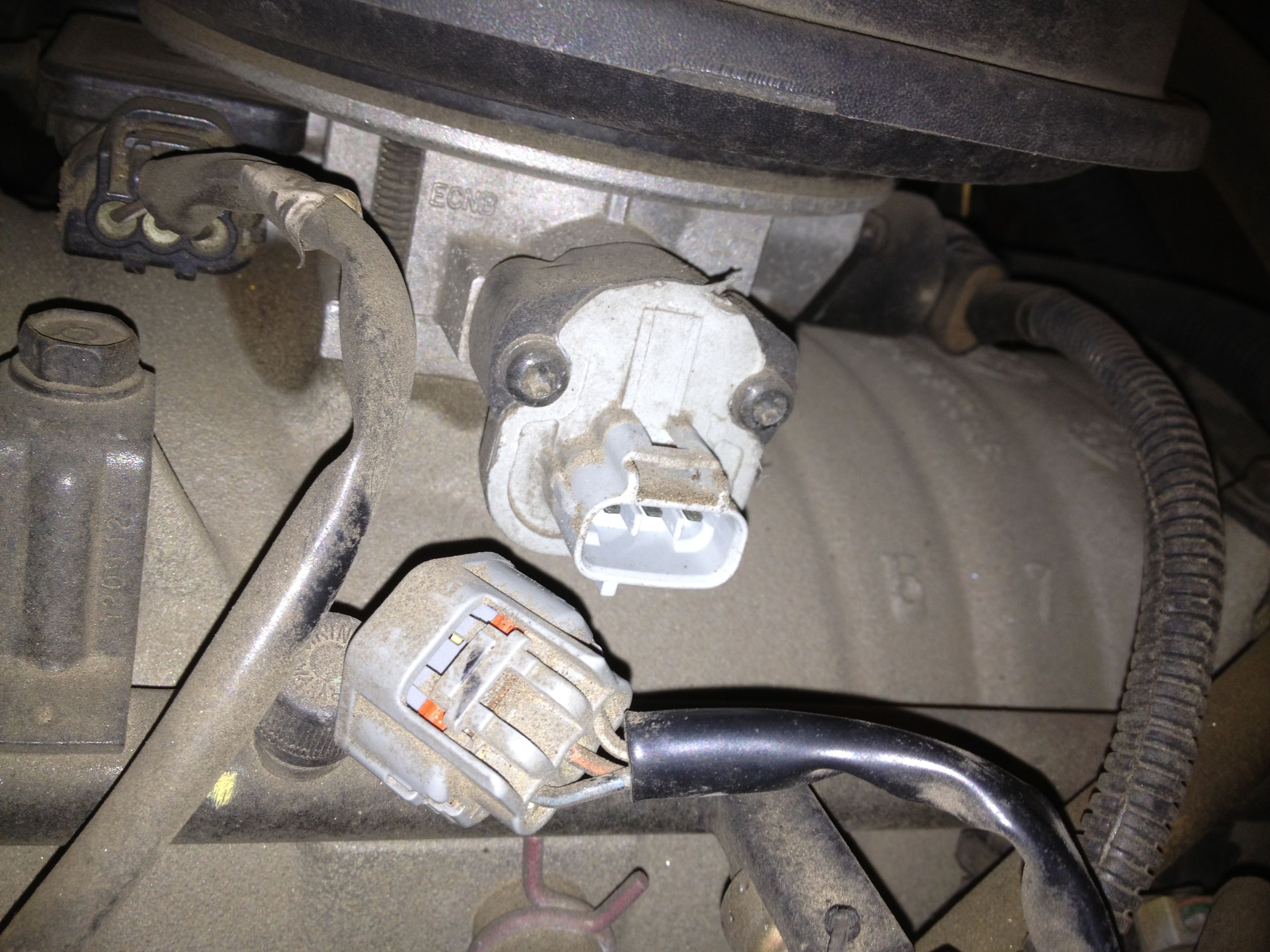
Inspect the TPS and its wiring for visible damage. Look for cracked sensor housing, loose connectors, or corroded pins. Check wiring harnesses for frayed or broken wires near the throttle body. Dirt and grime can also affect sensor contacts. Clean the area carefully to avoid false readings. Proper sensor mounting is essential to avoid movement that causes wrong signals. A thorough visual check often spots obvious faults quickly.
Testing With Multimeter
Use a digital multimeter to measure TPS voltage output. Disconnect the sensor connector and probe the signal wire. Slowly open the throttle while watching voltage changes. The voltage should increase smoothly from about 0.5 volts at closed throttle to around 4.5 volts at wide open throttle. Any sudden jumps, drops, or flat readings show a failing sensor. Also, test sensor resistance and ground connections for continuity. This method confirms electrical function precisely.
Checking For Error Codes
Scan the vehicle’s computer for stored trouble codes related to the TPS. Codes like P0120, P0121, or P0122 indicate specific sensor faults. Record all codes and clear them after diagnosis. Drive the vehicle and rescan to check if codes return. Persistent or recurring TPS codes suggest a sensor or wiring problem. Error codes help guide repairs by identifying exact issues in the throttle control system.
Fixes And Repairs
Fixing throttle position sensor problems in a Dodge Durango requires careful diagnosis and proper repair steps. Addressing these issues quickly helps restore smooth engine function and improves vehicle performance. Various repair options exist depending on the sensor’s condition and wiring status.
Some fixes are simple and cost-effective, like cleaning the sensor. Others may require sensor replacement or electrical repairs. Calibrating the sensor ensures accurate data for the engine control unit. Proper repair keeps your Durango running reliably and efficiently.
Sensor Cleaning Procedures
Start by disconnecting the battery to ensure safety. Locate the throttle position sensor on the throttle body. Use an electronic parts cleaner or throttle body cleaner spray. Gently spray the sensor and its connector pins without damaging them. Allow the sensor to dry completely before reconnecting. Cleaning removes dirt and grime that cause false readings. Test the vehicle to see if symptoms improve after cleaning.
Replacing The Throttle Position Sensor
If cleaning does not help, replacing the sensor may be necessary. Purchase a compatible throttle position sensor for your Durango model. Disconnect the battery and unplug the sensor wiring harness. Remove screws or bolts holding the sensor in place. Install the new sensor carefully and tighten screws securely. Reconnect the wiring harness and battery. Start the engine and check if the Check Engine light turns off. Replacement often solves persistent sensor faults.
Recalibrating The Sensor
After cleaning or replacing the sensor, recalibration may be needed. Some Durango models require a throttle position sensor reset using a scan tool. The scan tool communicates with the vehicle’s computer to adjust sensor parameters. Follow instructions for your specific tool and vehicle model. Recalibrating ensures the sensor provides accurate throttle position data. This step prevents further drivability issues and warning lights.
Repairing Wiring And Connectors
Damaged wiring or poor connections cause many sensor problems. Inspect wiring harnesses for cuts, corrosion, or loose connections. Use a multimeter to test for continuity and voltage at sensor terminals. Repair any damaged wires by soldering or using electrical connectors. Clean corroded terminals with contact cleaner. Secure connectors firmly to prevent disconnections. Proper wiring repairs restore signal flow and sensor function.
Resetting Tps On Dodge Durango
Resetting the Throttle Position Sensor (TPS) on a Dodge Durango can solve many throttle-related issues. The TPS controls how the engine receives throttle input. When it malfunctions, the vehicle may hesitate, stall, or have poor acceleration. Resetting the sensor helps the engine’s computer relearn the correct throttle position. This process can restore smooth driving and better fuel efficiency.
There are different ways to reset the TPS on your Dodge Durango. Some methods require no special tools, while others use diagnostic devices. Knowing the right steps can save time and money. Below are simple methods to reset the TPS safely and effectively.
Manual Reset Steps
Start by turning the ignition key to the “ON” position without starting the engine. Wait for about 10 seconds. Next, press the gas pedal slowly to the floor and hold it there for 5 seconds. Release the pedal gently and turn off the ignition. Wait for a minute before restarting the engine. This manual reset can help the engine control module relearn the throttle position.
Using Diagnostic Tools
Many modern Dodge Durango models allow TPS reset through diagnostic tools. Connect an OBD-II scanner to the vehicle’s diagnostic port. Turn on the scanner and select the “Throttle Position Sensor” or “TPS” option. Follow the prompts to reset or recalibrate the sensor. This method provides a more precise reset and can clear related trouble codes from the engine control unit.
When To Seek Professional Help
If the TPS reset does not fix your throttle problems, a professional mechanic should inspect the vehicle. Persistent issues may indicate a faulty sensor or wiring problems. Technicians can perform detailed diagnostics and replace the TPS if needed. Avoid driving with a failing sensor, as it can cause unsafe engine behavior and reduce fuel efficiency.
Cost Of Tps Replacement
Replacing the throttle position sensor (TPS) on a Dodge Durango involves certain costs. Understanding these costs helps you prepare better. The price varies depending on parts, labor, and where you choose to get the repair. Being aware of these factors can save you money and time.
Parts And Labor Estimates
The cost of the TPS part itself usually ranges from $50 to $150. Labor charges depend on the mechanic’s hourly rate. Typically, it takes about 1 to 2 hours to replace the sensor. Expect labor costs between $75 and $200. Overall, TPS replacement can cost between $125 and $350. Prices may vary by location and the vehicle’s model year.
Diy Vs Professional Repair
Replacing the TPS yourself can cut labor costs completely. The job requires basic tools and some mechanical knowledge. You must follow safety steps carefully to avoid damage. A professional mechanic ensures a correct and fast repair. They also provide a warranty on their work. Choose DIY if you feel confident. Otherwise, trust a professional to avoid mistakes.
Cost-saving Tips
Buy TPS parts from trusted online stores or local auto shops for better deals. Compare prices before purchasing. Use coupons or discounts if available. Schedule repairs during off-peak times to get lower labor rates. Some shops offer free diagnostics that can confirm the TPS issue. Preventive maintenance can reduce future repair costs. Keep your Durango’s throttle system clean and checked regularly.
Credit: k0lee.com
Preventing Future Tps Problems
Preventing future problems with the throttle position sensor (TPS) in your Dodge Durango is essential. Proper care helps maintain smooth engine performance and avoids costly repairs. Small efforts in maintenance can extend the sensor’s life and ensure your vehicle runs reliably.
Regular Maintenance Tips
Check the TPS during routine vehicle inspections. Replace worn or damaged parts promptly. Use a scan tool to monitor sensor readings for accuracy. Regular oil changes keep engine components clean and functioning well. Follow the manufacturer’s schedule for maintenance to avoid sensor issues.
Avoiding Electrical Issues
Inspect wiring harnesses connected to the TPS for damage or corrosion. Secure loose wires to prevent disconnection or short circuits. Avoid exposing electrical parts to moisture or dirt. Use dielectric grease on connectors to protect from corrosion. Address battery or alternator problems quickly to maintain stable voltage.
Keeping Sensor And Throttle Body Clean
Clean the throttle body regularly to prevent dirt buildup. Use throttle body cleaner and a soft cloth for gentle cleaning. Avoid harsh chemicals that can damage sensor parts. Remove carbon deposits that may affect sensor readings. Ensure the sensor is dry before reinstallation to prevent electrical shorts.
Frequently Asked Questions
What Are The Symptoms Of A Failing Throttle Position Sensor?
Symptoms of a failing throttle position sensor include Check Engine light, erratic or poor acceleration, rough idle, engine stalling, and increased fuel consumption. You may also notice hesitation during acceleration, difficulty shifting gears, and the vehicle entering limp-home mode.
How Do You Reset The Throttle Position Sensor On A Dodge Durango?
To reset the throttle position sensor on a Dodge Durango, disconnect the battery for 15 minutes. Reconnect it, then start the engine to let the ECU relearn sensor settings. This process clears sensor data and helps restore proper throttle response.
What Is The Most Common Problem With Dodge Durangos?
The most common problem with Dodge Durangos is a faulty throttle position sensor. This causes rough idling, stalling, poor acceleration, and the Check Engine light to illuminate.
How To Fix A Malfunctioning Throttle Position Sensor?
Clean or replace the throttle position sensor to fix malfunctions. Check wiring and connectors for damage. Use a diagnostic tool to reset error codes. Test sensor output to ensure proper function. Consult a mechanic if problems persist.
What Are Common Symptoms Of A Dodge Durango Tps Problem?
The Check Engine light may come on, with rough idling and poor acceleration.
Conclusion
Throttle position sensor problems can cause many driving issues. You might notice rough idling, poor acceleration, or engine stalling. These signs often mean the sensor needs attention. Ignoring the problem can lead to worse engine performance and higher fuel costs.
Early diagnosis helps keep your Dodge Durango running smoothly. Regular checks ensure the throttle position sensor works correctly. Stay alert to warning signs and act quickly to avoid bigger repairs. Maintaining this sensor protects your vehicle’s health and your driving experience.